Customize dashboard columns and see totals with fees
What changed
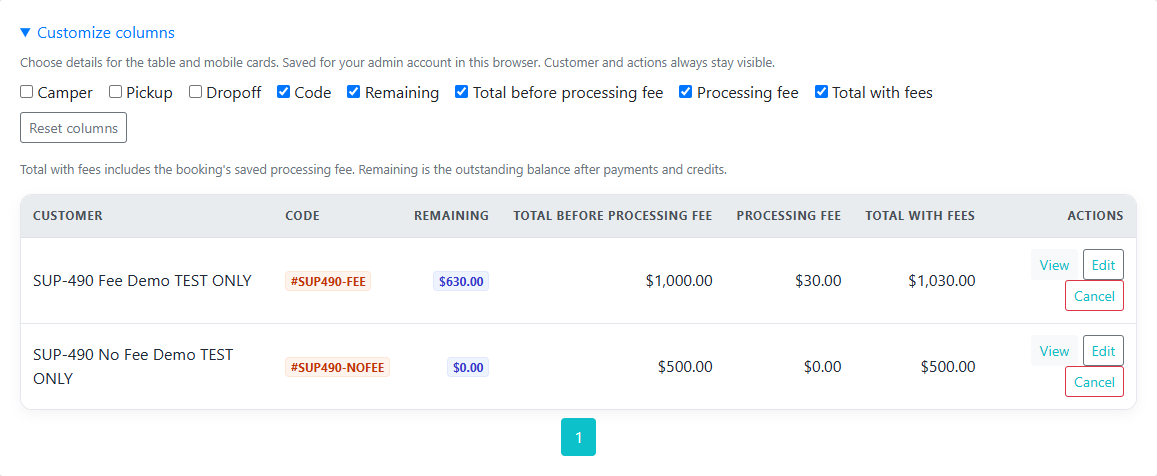
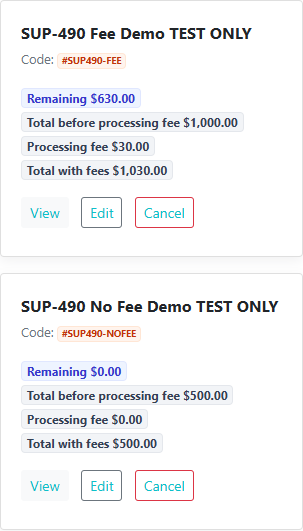
The admin dashboard now shows Total with fees, including the processing fee saved on each booking. Remaining continues to show the outstanding balance after payments and credits.
You can also choose which booking details appear in the dashboard table and mobile cards.
Where to find it
Open Admin Dashboard and select Customize columns above the booking list.
- Show or hide inventory, pickup and return dates, booking code, remaining balance, total before processing fee, processing fee, and total with fees.
- Customer names and booking actions stay visible.
- Your choices are remembered for your admin account in the same browser and website.
- Select Reset columns to restore the default view.
This display uses the booking's saved fee; it does not recalculate old bookings using today's fee setting or change any charges.
The examples shown use fictional demo bookings. The fee example has a $1,000 booking total, a $30 processing fee, a $1,030 total with fees, and $630 remaining.